Continue reading GTA IV Bloopers, Glitches & Silly Stuff 10-1
Author: Sektor
GTA2 Game Hunter v1.520
– Clicking on your own nick in the player list no longer clears the chatbox
– Create Game only builds the map list on first load and when refresh is ticked
– Minor improvements to GTA2 folder detection
– You don’t lose unsaved settings when trying to start another settings window while one is already open
– Settings window is given focus after browsing for a file
– Clicking cancel after browsing for a sound doesn’t clear an existing sound
– Readded sanity checking for error during tabIRC “Invalid procedure call or argument”
– Fixed timestamp saving on first run with no previous settings
– Missing STY, GMP and SCR filename are displayed when an MMP file is removed

GTA2 Game Hunter v1.519
– MMP files with missing GMP, STY or SCR are deleted
– MMP files that are made obsolete by a new MMP with no PlayerCount restriction are deleted
– Increased text label width on settings screen to help fit non standard DPI fonts (Wine!)
– Selecting a chat tab gives focus to the chatbox
– Closing create game using the close button saves position and selected map settings
– Fixed a bug that only loaded the create game settings once per session unless you clicked refresh
Retro City Rampage for XBLA and WiiWare

Retro City Rampage XBLA summer 2011 and WiiWare fall 2011.
The Brothers Mario
GTA2 Game Hunter v1.518

- “If your ports are closed” message is only displayed if gateway IP starts with 192.168 or 10.
- If your first alert word is detected then the GH systray icon is changed
- Added Always in tray, Start in tray and Close to tray settings
- Added run at startup option to settings
- Added highlight alert words option to settings and view menu
- Added timestamp messages checkbox to settings
- Added alt+letter keyboard shortcuts to most settings
- Fixed “Unable to unload within this context” error
- You can switch between “Find This Game” and the map list by pushing tab and shift+tab
GTA2 Game Hunter v1.517
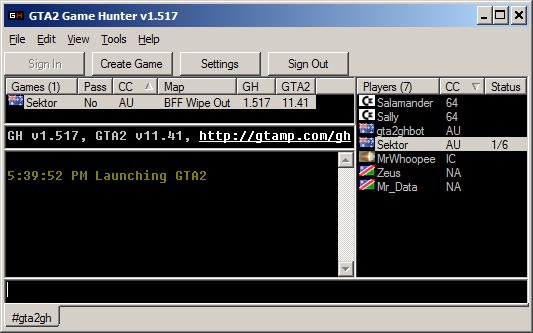
2010-11-16 v1.517
- Fixed a bug that displayed every map twice in the Create Game map list unless you clicked refresh
- Changed tabbing order on Create Game form
2010-11-16 v1.516
- “Find This Map” now correctly shows all the matching maps
- Added a drop-down list for filtering maps based on player count (defaults to only showing 2 player maps)
- Country is only redetected on startup if your IP has changed from last run
- Changed country detection site back to geoloc.daiguo.com/?self
- Fixed some display issues with the Create Game form
Grand Theft Auto Trilogy out now for Mac

GTA III, Vice City and San Andreas have finally been ported to Mac. Of course the true GTA trilogy would be GTA1, GTA London and GTA2. I’d love to see Rockstar Games dust off and revive that classic code.
RDR: Undead Nightmare Launch trailer
RDR: Multiplayer Undead Overrun trailer
Presenting the brand-new “UNDEAD OVERRUN” Red Dead Redemption: Undead Nightmare multiplayer video – band together online with other survivors of the zombie apocalypse to fight off waves of vicious hordes of the living dead. Use your wits, solid teamwork and of course high-powered weaponry including Holy Water and other new zombie-killin’ tools included in the game.