Sektor's DS development site
News | FlashbackDS | SpoutDS | DiggerDS | dualHexen | CdogsDSFlashbackDS
2011-07-30
Alekmaul has ported the latest version of REminiscence to DS. It has support for the PC CD SEQ movie files and is faster than previous DS versions. This is the best port, so ignore the links below this post.2007-06-16
GPF's REminiscenceDS. It's based on newer code and currently has more features than FlashbackDS v0.24. I have mirrored GPF's REminiscenceDS here: DSREminiscence-0.1.9.rar, DSREminiscence-0.1.9SRC.rar2007-03-06

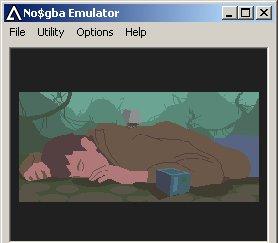
flashbackDS_0.24_bin.7z - NDS binaries - compressed with 7-Zip
flashbackDS_0.24_src.7z - source code
flashback_data_files.7z () - 9MB (includes DOS files, Amiga music, SegaCD speech, English, French and Italian cinematics)
Features:
- Sound effects (not great but better than nothing)
- Music plays but it sounds like poop
- Level select. You can scroll through level codes on the password screen. Up/down for skill, left/right for level.
- Resources and music are read from /data/flashback/data/ on a compatible media device
- Saves are stored at /data/flashback/
- DS sleeps when you close the LID (you'll have to pause manually)
- DLDI support
Things that still need to be done by someone:
- Improve sound code
- Stop music from sounding like poop
- Make text easier to read (scaling issue)
- Speed up cut scenes and fix cut scene glitches
- Build a flying car
Requirements:
-------------
A Nintendo DS and a compatible DS homebrew device.
How to use:
-----------
Step 1:
- Figure out what device you own
- flashbackDS.nds is for GBAMP, MMD and most slot-1 devices like R4, M3 Simply, DS-X, SCOne
- flashbackDS.gba.nds is for most slot-2 devices like SCSD, SCCF, SC Lite microSD, M3SD, M3CF
- If you have a GBAMP, M3CF, SCCF, SCSD or another old device supported by libfat's built-in driver or your flashcart automatically DLDI patches then you don't need to use the DLDI patch. Skip Step 2.
Step 2:
- Download dlditool and the DLDI driver for your device
- Patch flashbackDS.nds or flashbackDS.gba.nds with a DLDI patch for your device
Step 3:
- Copy flashbackDS.nds or flashback.gba.nds to any folder on your card (on DS-X it's best to use the apps folder)
- Copy the flashback data files to X:\data\flashback\data\ (replace X: with the drive letter of your device)
- Launch FlashbackDS and hopefully it will find the required files and begin
DS controls:
----------------------------------------------
d-pad move Conrad
A draw/holster gun
B talk / use / run / shoot
X use the current inventory object
Y display the inventory / skip movies
L display the options
R toggles fast mode
These libs/toolchain were used (thanks to the authors!)
----------------------------------------------
devkitARM_20 and libnds-20070127
SDL-1.2.9ds.rar
NDSzlib-1.2.2.rar
libfat-nds-20070127
libcartreset 0.72
Links
- Official REminiscence site
- REminiscence mirror site
- GPF's DS port of REminiscence - Uses SDL. It now plays sound and cutscenes better than my version.
- xFlasH's port of REminiscence This was the first REminiscence port to DS but it's not well known on English sites. It has no sound effects or music. It requires a slot2 device and uses GBFS (data files have to be attached to the .nds). It doesn't use SDL, so cut-scenes are faster than other ports. It uses French language by default. Source code has not been released.
- Another World GBA - This has music and sound. The original author of Another World gave permission for the GBA version to be released.